Let their wearable fill in the numbers
A wearable integration built into your client's app. They connect Oura, Whoop, Strava, Ultrahuman or their phone's health app, and their steps, sleep and heart rate fill in your check-ins and habits for them.







 Coming soon
'/%3e%3cpath%20d='M276.785%2051.699c2.793%2035.691-26.5%2067.156-61.977%2068.25-37.496%201.16-64.629-31.566-57.223-68.25h119.199m-3.721-16.316C264.305%2012.879%20242.613-.59%20218.844.031c-23.469.605-44.879%2014.633-55.52%2035.352h109.738'%20fill='rgb(90.588235%25,9.803922%25,20%25)'/%3e%3cg%20fill='rgb(13.72549%25,12.156863%25,12.54902%25)'%3e%3cpath%20d='M37.457%2051.699h64.07c4.426%200%208.27-3.594%208.68-8.008.422-4.605-3.047-8.309-7.672-8.309H25.848l9.738-28.344c.836-2.418%203.172-4.141%205.754-4.141h67.512c22.988%200%2040.25%2018.914%2038.121%2041.809-2.031%2021.926-21.137%2039.352-43.137%2039.359l-42.176.016c-3.922.004-7.301%202.469-8.5%205.957L45.5%20112.34c-.832%202.422-3.16%204.148-5.738%204.148H8.672c-5.504%200-8.902-5.234-7.133-10.383l13.031-37.91c3.324-9.68%2012.574-16.496%2022.887-16.496m594.563%2064.789l-7.187-26.887c-.91-3.398-3.77-5.523-7.25-5.523l-9.961.004c-3.922.004-7.301%202.469-8.5%205.957l-7.656%2022.301c-.836%202.422-3.164%204.148-5.742%204.148h-31.09c-5.504%200-8.902-5.234-7.129-10.383l13.027-37.91c3.324-9.68%2012.574-16.496%2022.887-16.496h64.07c4.426%200%208.273-3.594%208.68-8.008.426-4.605-3.047-8.309-7.672-8.309H571.81l9.742-28.344c.832-2.418%203.168-4.141%205.75-4.141h67.516c22.984%200%2040.246%2018.914%2038.117%2041.809-1.434%2015.465-11.359%2028.684-24.797%2035.141l9.816%2036.641H632.02'/%3e%3cpath%20d='M350.039%2035.383l8.68-25.258c1.23-3.578-1.172-7.227-5.004-7.227h-34.094c-2.578%200-4.918%201.723-5.75%204.141l-9.742%2028.344h45.91m28.344%2081.105h-91.43c-5.504%200-8.898-5.234-7.129-10.383l18.695-54.406h45.91l-6.406%2018.641c-1.77%205.148%201.703%2010.383%207.199%2010.383h38.953c5.508%200%209.016%205.223%207.25%2010.363l-7.309%2021.254c-.832%202.422-3.156%204.148-5.734%204.148M483.973%205.074l-25.262%2030.309h68.043l-2.547-27.73c-.258-2.793-2.547-4.754-5.34-4.754h-30.25c-1.805%200-3.5.801-4.645%202.176m9.192%20111.413h34.398c3.457%200%206.352-3.148%206.039-6.617l-5.348-58.172h-83.141l-43.016%2051.613c-4.359%205.234-1.309%2013.176%205.684%2013.176h27.324c1.805%200%203.512-.891%204.648-2.266l22.582-27.082c1.645-1.977%204.105-3.066%206.691-3.066h9.227c4.008%200%207.301%202.777%207.672%206.801l1.91%2020.758a5.3%205.3%200%200%200%205.328%204.855'/%3e%3c/g%3e%3c/svg%3e) Coming soon
Coming soon Coming soon
Your clients' watches know more than their check-ins.
Your client wears a Garmin all week, then guesses their sleep and steps when the check-in comes round. Or they send screenshots from three apps in a DM and you type the numbers in yourself. Either way, you're planning from rough estimates instead of what their device recorded.
- Guessed numbersClients estimate sleep and steps from memory, so the data you plan from is rough.
- Screenshots in your DMsWhoop, Oura and Garmin screenshots land in WhatsApp and never make it into a chart.
- One more thing to typeEvery number a client types by hand is one more reason to put the check-in off.
Connect once. The numbers fill themselves in. On the forms you already use.
What each device fills in. Pick one to see.
- Steps
- Sleep
- Sleep stages
- Heart rate
- Resting heart rate
- HRV
- Active energy
- Distance
- VO2 max
- Weight
- Workout time
- Floors climbed
- Body temperature
- Blood glucose
- Water
- Body fat
What syncs also depends on your client's device model and the permissions they give.
Coming soonComing soon means the integration is built and we've requested access. We're waiting on the company to approve it, and it switches on in your clients' app as soon as they do.
A wearable integration that fills in your forms.
Clients link a wearable metric to a number question on your form, like steps or sleep. When they open the check-in or daily habit, it's filled in and labelled with the device it came from.
- Works on check-ins and daily habits
- Labelled From Oura, From Whoop and so on
- A number they type is never overwritten
- StepsDaily habitSteps
- Sleep durationDaily habitSleep
- Steps11,208From Ultrahuman
- Sleep duration7h 51mFrom Oura
- Morning weight71.4 kgTyped in
Read it where you already review.
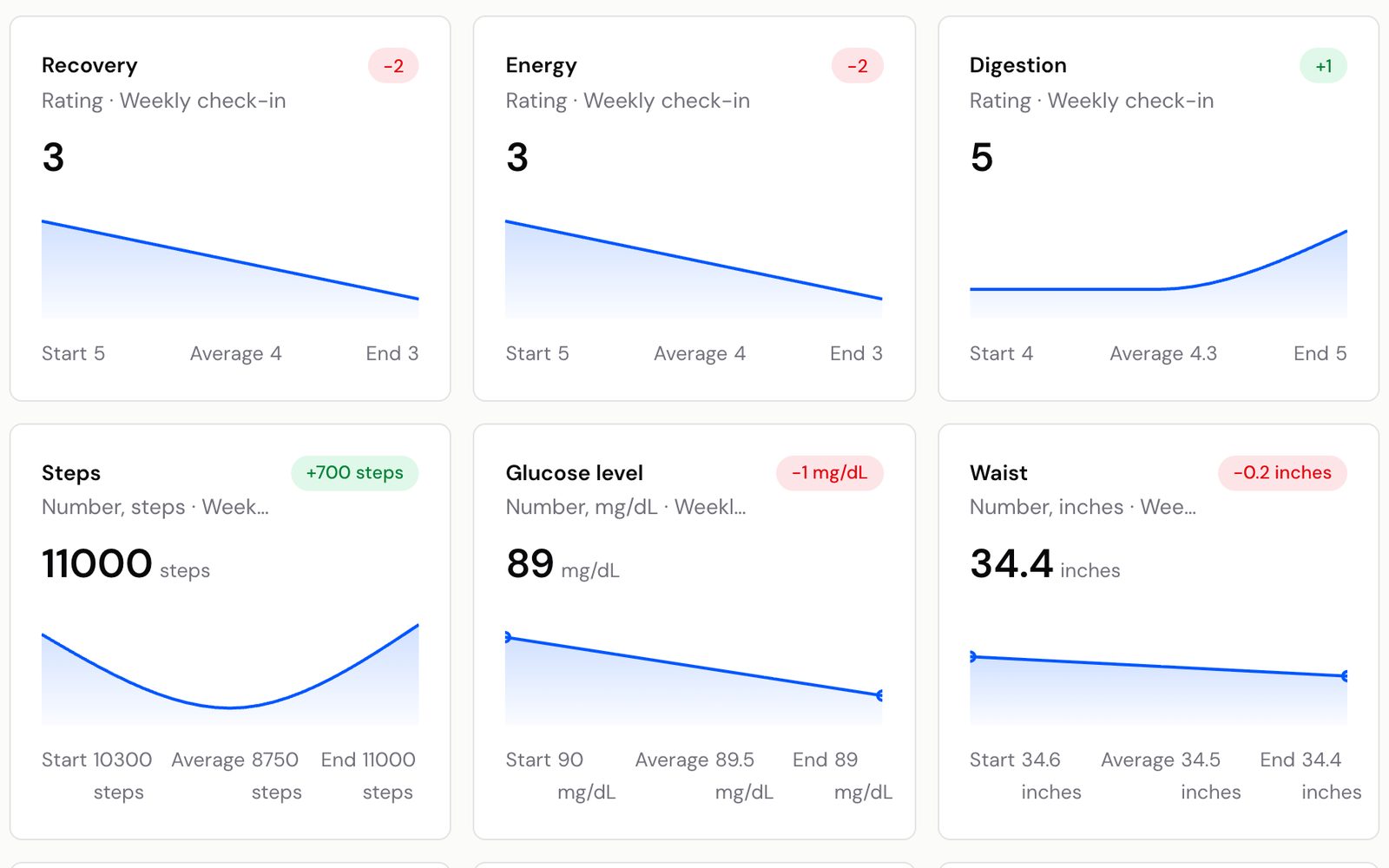
Synced numbers become normal answers, so you see them in each check-in next to last week's and charted on the client's Metrics page. There's no separate dashboard to remember.
- Compared week to week like any answer
- Charted alongside every check-in answer
- Sleep fills in as hours and minutes
Health data, shared on their terms.
Clients agree to share health data before anything syncs. They can disconnect one service, or withdraw consent to stop every sync, from their app.
- Consent asked before the first connection
- Disconnect any service at any time
- Withdrawing consent stops all syncing
Jess agreed to share health data with her coach.
- ConnectedDisconnect
- ConnectedDisconnect
Screenshots in your DMs, compared with Kahunas.
How it works. Your client does the setup.
- Average daily stepsNumber1Add number questionsAsk for steps, sleep or resting heart rate on your check-in or daily habit form.
- ConnectConnected2Clients connectThey open Wearables in their app, connect their device and agree to share health data.
- Average daily stepsFrom UltrahumanSteps3They link the numbersUnder Synced metrics they choose which device fills each question. From then on, it fills in.
Questions coaches ask. Answered.
Works well with
Coach from what their device recorded
“Try Kahunas for 3 months, not just 14 days. If you're not satisfied for any reason, message us in the chat and I'll personally refund you the same day.”
 Mark · Founder of Kahunas