Know what changed for every client this week
Build your client check-in form once and clients fill it in on their phone. Every answer lands in one inbox next to their last check-in, so you see what moved and reply in the same place.






Reading check-ins shouldn't take your whole Sunday.
The answers sit in Google Forms, the progress photos arrive on WhatsApp and the weights live in a spreadsheet you update by hand. Every week you open three tabs per client, scroll back to see what changed and try to remember who's still waiting on a reply.
- Answers in one app, photos in anotherForms, photos and numbers arrive in different places, so every review starts with a hunt.
- No quick way to see what changedSpotting a slide in sleep or stress means digging out last week's answers and comparing them line by line.
- Missed check-ins go unnoticedNothing tells you when a client skips a week, so the quiet ones drift until they cancel.
Every check-in in one inbox, next to the last one. Reply, mark it reviewed, next client.
Ask for what you need to see. Pick a question type to see what your client fills in.
Clients see their last answer under each question, and their answers save as they go, even offline.
Every client check-in, side by side with the last.
Open any check-in to see each answer next to an earlier one you choose. Plan in place shows the training and nutrition plans they were on, with a badge when a plan changed.
- Compare with any earlier check-in
- Changed or Replaced badges on their plans
- Photos and videos shown under each question
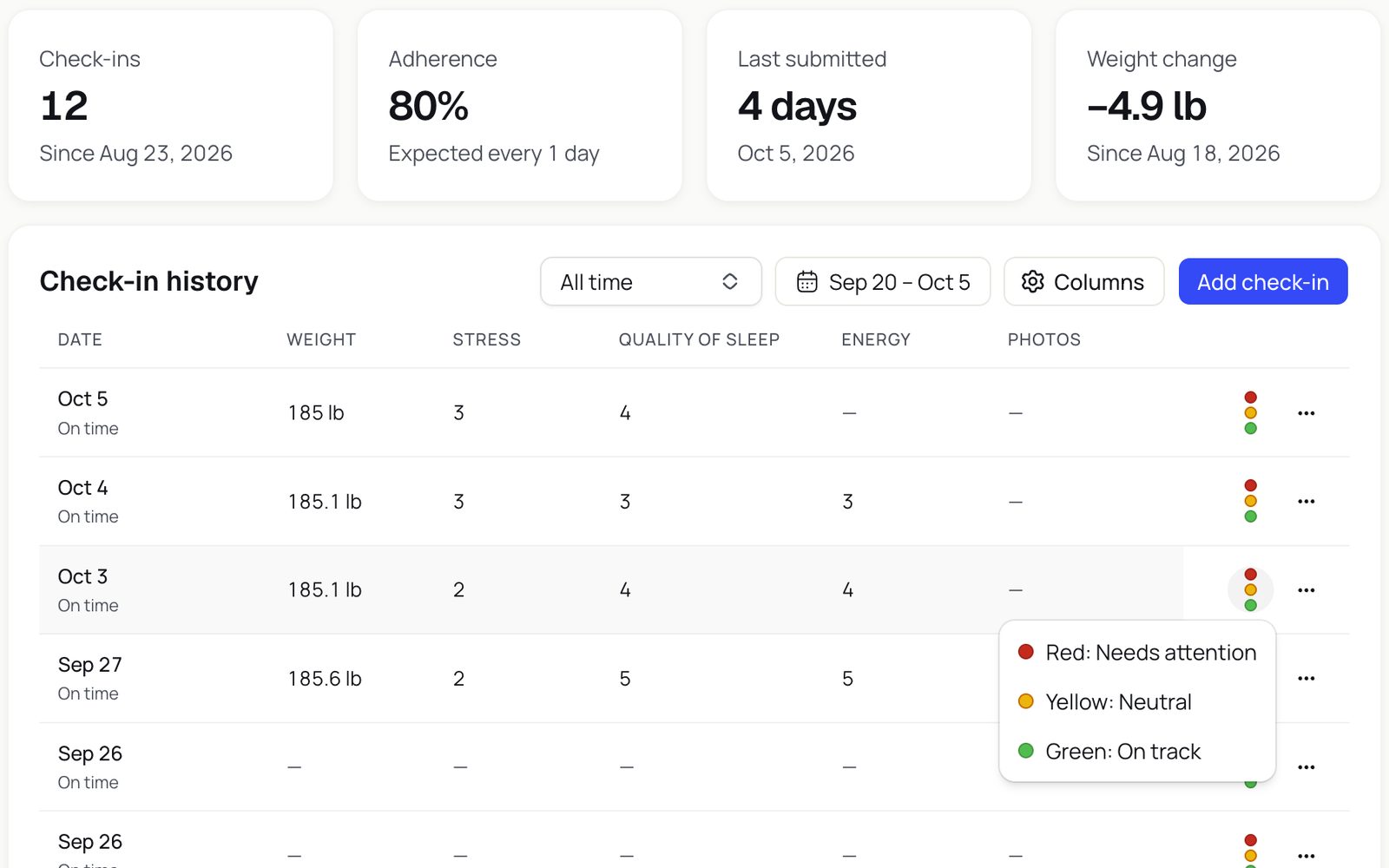
Read a client's history at a glance.
Each client's Check-ins section shows how many they've sent, how often they're on time, when the last one arrived and how their weight has moved, above a history you can flag red, yellow or green.
- Adherence, last submitted and weight change
- Flag check-ins red, yellow or green
- Choose the metric columns you see
Build the form once, assign it to everyone.
Create a check-in with the questions you care about, show it on one page or step by step, then assign it to clients or attach it to a package to give it to everyone on it.
- Number, rating, photo, video and file questions
- Check-in days and cadence set per client
- Start from the weekly check-in template
- WeightNumber
- Quality of sleepRating
- Progress photosAdd Image
- Squat from the sideUpload Video
- Blood test resultsAttach File
- JTJess TaylorMonWeekly
- SPSam PatelThuEvery 2 weeks
- PSPriya ShahSunEvery 4 weeks
Google Forms and a spreadsheet, compared with Kahunas.
How it works. Set it up once.
- WeightNumberQuality of sleepRatingProgress photosAdd ImageAdd a question1Build your check-inStart from the weekly template or add your own questions, from weight and sleep to progress photos.
- JTJess TaylorCheck-in daysMonMonTueWedThuFriSatSunCheck-in cadenceWeeklyWeeklyEvery 2 weeksEvery 4 weeks2Assign itPick the clients, their check-in days and how often: weekly, every two weeks or every four weeks.
- Review11Missed2Done32JTJess TaylorTodayMark reviewedDone3Review from one inboxNew check-ins land under Review. Open one, reply to your client and mark it reviewed.
Questions coaches ask. Answered.
Works well with
See every client's week in one place
“Try Kahunas for 3 months, not just 14 days. If you're not satisfied for any reason, message us in the chat and I'll personally refund you the same day.”
 Mark · Founder of Kahunas