Explain it once, and every client gets it at the right time
Put your videos, guides and articles in one resource library, choose which packages see each folder, and release pieces days or weeks after a client joins. Then see what gets opened.


- Welcome to coachingStraight away
- Sleep resetAfter 7 days
- Deload weeks explainedAfter 14 days
- Travel training planAfter 4 weeks
- Welcome to coachingLockedUnlocks 13 OctVideo · Coaching resources
- Sleep resetLockedUnlocks 20 OctAudio · Sleep Guides
- Deload weeks explainedLockedUnlocks 27 OctArticle · Strength Guide
- Travel training planLockedUnlocks 10 NovDocument · Strength Guide

You keep sending the same PDF to every new client.
A new client signs up and you dig through Google Drive for the sleep guide, the macro cheat sheet and that video on bracing. You send the links one by one, they sink in the chat, and a week later the client asks the same question again.
- Links lost in the chatGuides and videos get buried under messages, so clients ask for them again.
- No idea what gets readYou can't tell if anyone opened the guide you spent a weekend writing.
- Everything on day oneNew clients get every resource at once and read none of it.
Put it in the library once. Kahunas hands it out.
Every client sees their own library. Pick a package and a week to see what's open.
- Welcome to coachingCoaching resourcesOpen
- How check-ins workCoaching resourcesOpen
- Bracing for heavy liftsStrength GuideOpen
- Macro cheat sheetNutrition GuidesNot in this package
- Sleep resetSleep GuidesOpen
- Eating out guideNutrition GuidesNot in this package
- Deload weeks explainedStrength GuideOpens in 7 days
- Travel training planStrength GuideOpens in 21 days
Each folder or piece goes to every package or just some, and opens a set number of days or weeks after a client's package starts. Until then, clients see it locked with the date it opens.
One resource library for everything you send.
Upload videos, audio and documents, add links or write articles, then sort them into folders with cover images. Keep drafts until they're ready and feature the pieces that matter most.
- Videos, audio, documents, links and articles
- Folders with their own cover images
- Featured pieces sit at the top for clients
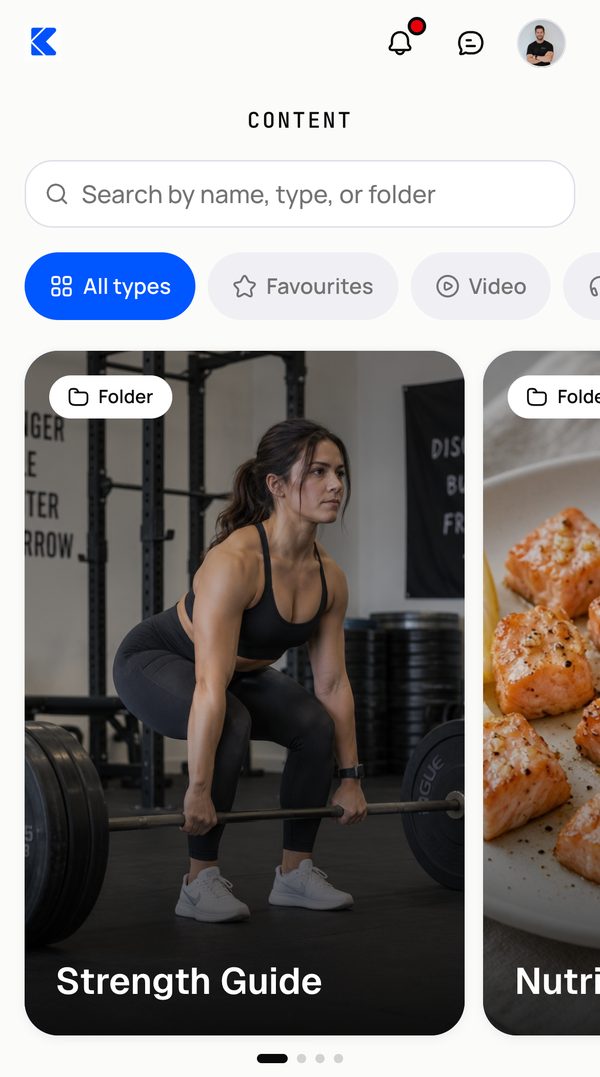
- Strength Guide6 pieces · All packages
- Nutrition Guides4 pieces · 2 packages
- Welcome to coachingVideo · Coaching resourcesFeatured65
- Sleep resetAudio · Sleep Guides42
- Macro cheat sheetDocument · Nutrition Guides37
- Eating out guideLink · Nutrition Guides18
- Race week fuellingArticle · Nutrition GuidesDraft0
Clients save it and pick up where they left off.
Your library sits in your clients' app with folders, search and favourites. Videos play right in the app, resume where they stopped and can be saved to the phone to watch offline.
- Videos play inside the app
- Saved to the phone for offline viewing
- Favourites for the pieces they come back to
 Pick up where you left off4:12 / 9:30
- Deload weeks explainedArticle · Strength Guide
- Warm-up routineVideo · Strength Guide
Google Drive and a chat thread, compared with Kahunas.
How it works. Add it once, in three steps.
- Upload videobracing-cues.mp4214 MBFolderStrength Guide1Add your contentUpload a file, add a link or write an article, and put it in a folder.
- All packagesSelected packages
- Strength CoachingImmediately
- Online EliteAfter 2 weeks
2Set who gets itChoose every package or just some, and when it opens for them. - Library previewBracing for heavy liftsVideo · File attached
- Goes to
- 2 packages
- Opens
- Varies by package
3Publish itCheck the preview and add it to the library. Clients see it in their app.
Questions coaches ask. Answered.
Works well with
Answer the same question once
“Try Kahunas for 3 months, not just 14 days. If you're not satisfied for any reason, message us in the chat and I'll personally refund you the same day.”
 Mark · Founder of Kahunas